

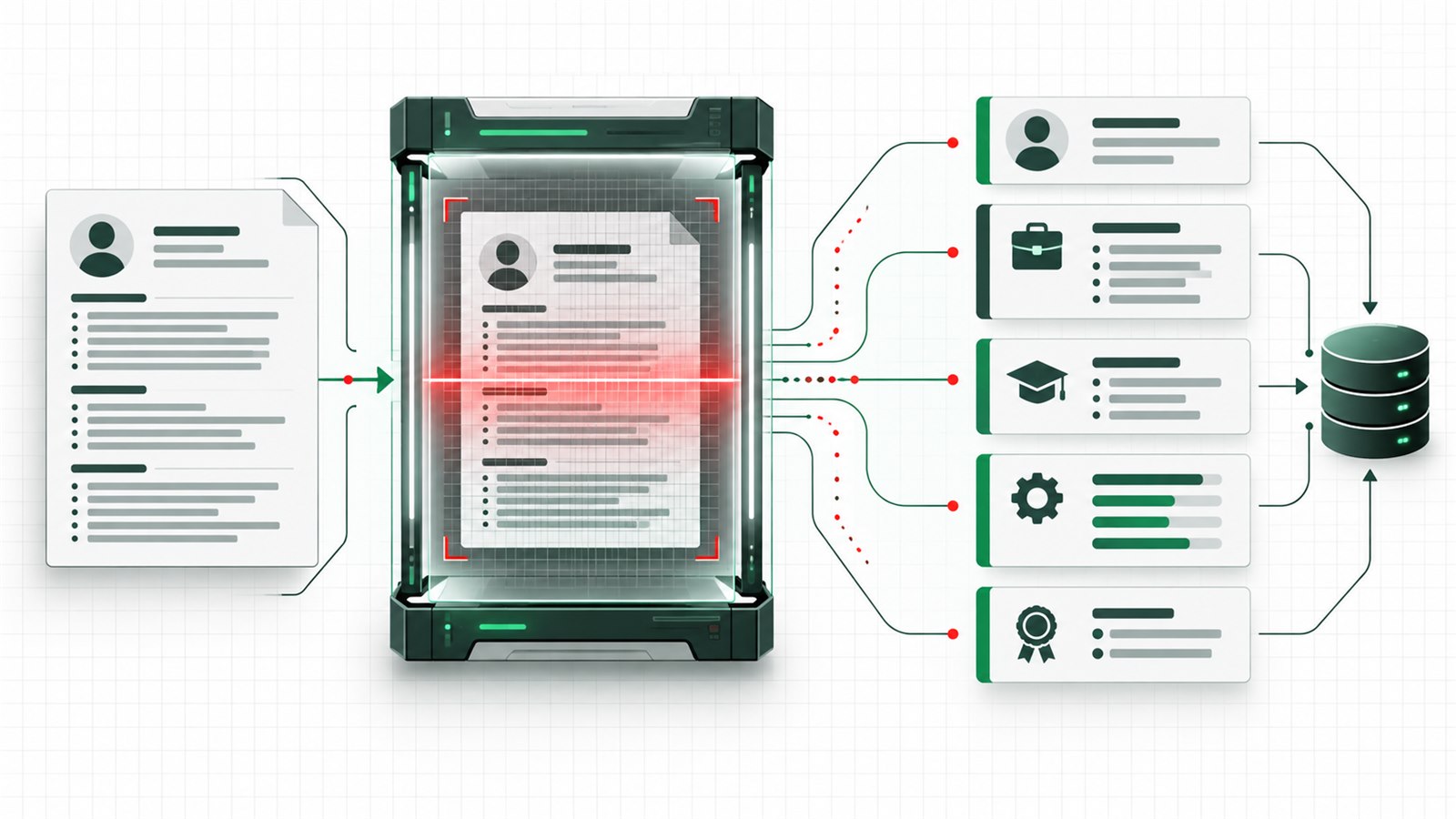
What is an ATS resume? It is a resume designed so an applicant tracking system can reliably extract its text and organize details such as contact information, employment history, education, and skills. An ATS-friendly resume also uses relevant job language truthfully, but it is still written for the recruiters and hiring managers who decide whether your evidence fits the role.
Get the editable templateCheck your file’s reading order
There is no universal “ATS-approved” template or guaranteed score. Employers use different systems, configurations, screening questions, and review processes. This InterviewCue AI guide focuses on a practical goal: make the document easy to parse, easy to search, and useful to a human reader.
How an ATS processes a resume
An applicant tracking system helps an employer collect and manage applications. Resume-related functions may include:
- Receiving the uploaded document.
- Extracting text and assigning it to fields such as employer, title, dates, education, and skills.
- Making applications searchable or filterable.
- Supporting recruiter review, workflow stages, notes, and communication.
- In some configurations, comparing application information with job criteria.
The exact behavior varies. Do not imagine one global robot that rejects every resume missing a secret keyword. A parsing error can hide or misclassify information, while weak relevance can make correctly parsed content unhelpful. You need both readable structure and convincing evidence.
Indeed’s ATS resume guide offers broader formatting advice. For a concrete system example, Greenhouse’s parsing documentation lists columns, graphics, tables, text boxes, and header or footer contact details among possible causes of incomplete extraction. These are readability risks to check, not evidence of a universal rejection rule.
What makes a resume ATS-friendly?
An ATS-friendly resume balances three qualities:
| Quality | Practical test | Failure to avoid |
|---|---|---|
| Parseable | Important text follows a predictable reading order. | Core details trapped in decorative elements. |
| Relevant | Job terminology appears where real experience supports it. | Unsupported keyword repetition. |
| Readable | A person can quickly understand role, scope, and results. | Dense or visually confusing copy. |
These qualities reinforce one another. A plain document full of unsupported keywords is not a strong resume. A beautiful two-column design that scrambles dates and job titles when converted to text creates unnecessary risk. A safe resume ATS format preserves meaning in both the rendered document and extracted text.
ATS-friendly formatting
Use one reading order
A single column gives the document a clear top-to-bottom sequence. If you use columns, sidebars, or text boxes, test the extracted text carefully. Essential content—job titles, employers, dates, skills, and achievements—should not depend on visual position alone.
Use standard headings
Choose labels a reader can recognize immediately:
- Summary
- Skills
- Experience or Professional Experience
- Projects
- Education
- Certifications
Creative labels such as “My Journey” or “Technical Toolbox” may introduce ambiguity without adding value.
Keep contact details in the body
Put your name and essential contact details near the top in ordinary body content. Avoid relying on a document header or footer for information the application needs to extract.
Keep typography simple
Use a common readable font, clear hierarchy, sufficient contrast, and consistent spacing. Bold is useful for job titles and employers. Multiple font families, tiny body copy, progress bars, star ratings, and skill charts usually make the page harder to scan.
Keep key information as text
Logos, icons, charts, profile photos, and screenshots should not carry skills or qualifications. A text-based bullet is more portable than a graphic claiming “90% Kubernetes.”
Follow upload instructions
Upload the type requested by the employer. PDF can preserve layout; DOCX may be requested or parse well in other workflows. There is no single correct file type for every system. After export, reopen the file and verify that text can be selected, copied, and read in the intended order.
Write each section clearly
Headings
Use one heading per section and keep the hierarchy visually consistent. Do not create a heading from spaced-out letters, an image, or a decorative shape.
Dates
Choose one format and use it throughout, such as “Jan 2023–Aug 2026” or “01/2023–08/2026.” Place each date close to the job or education entry it describes. Avoid vague years if the application asks for months.
Skills
Use text labels grouped by category. For example:
Languages: TypeScript, Python, Java
Backend: Node.js, REST APIs, PostgreSQL
Cloud and Operations: AWS, Docker, Kubernetes, Datadog
Only include tools you can discuss. If the job description uses a standard name and your experience supports it, use that recognizable spelling.
Work experience
Keep employer, title, location if relevant, and dates together. Write bullets that clarify action, technical object, method or constraint, and result. Keywords make the experience findable; evidence makes it persuasive.
Formatting mistakes to avoid
| Risk | What can go wrong | Safer choice |
|---|---|---|
| Confusing columns | Extracted content may appear out of sequence. | Prefer one column or test the plain-text order carefully. |
| Core content in tables or text boxes | Titles, dates, and neighboring rows may become separated. | Use ordinary text and spacing for experience entries. |
| Details in headers or footers | Some workflows may treat these areas differently. | Keep identity and contact details in the main reading flow. |
| Icons without labels | An icon does not reliably communicate an email address or skill. | Pair any icon with visible, meaningful text. |
| Image-only PDFs | Text may require optical character recognition before extraction. | Export a text-based file and verify selectable text. |
| Keyword stuffing | Repetition hurts readability without proving experience. | Use supported terms only where they add meaning. |
| Hidden white text | Hidden keywords are deceptive, inaccessible, and may surface. | Keep every included term visible and defensible. |
Choose ATS keywords
Do not copy every repeated word. Extract four useful groups:
| Keyword group | Examples for a backend role | How to use it |
|---|---|---|
| Core outcomes | reliability, latency, platform adoption | Show a relevant result or project |
| Responsibilities | API design, incident response, mentoring | Connect to work you actually performed |
| Tools and methods | PostgreSQL, Kubernetes, CI/CD | Use exact standard names when true |
| Domain and scale | payments, high-volume systems, regulated data | Add only when your background supports it |
Then label each item:
- Supported: evidence already appears in the resume.
- Supported but hidden: true experience exists but needs clearer wording or placement.
- Adjacent: related knowledge exists, but the exact claim would overstate it.
- Gap: you do not have evidence and should not add it.
The full guide to tailoring a resume to a job description shows how to build this evidence map and prioritize edits without fabricating fit.
Software engineer keyword example
This example is fictional.
Job description language
Build observable backend services and participate in production incident response.
Original bullet
Improved monitoring for payment applications.
Revised bullet, assuming the facts are verified
Added distributed tracing and service-level alerts to three payment services, then documented incident triage and rollback steps with the on-call team.
The revision uses recognizable concepts from the posting, but it does not claim an unverified reduction in incidents or diagnosis time. If the candidate has a reliable result, it can be added.
ATS-friendly resume template
The downloadable template uses one column, ordinary body paragraphs, Arial text, and recognizable section headings. Replace every placeholder with verified information and remove unused sections before applying.
Download editable ATS resume template (DOCX)Download matching PDF previewFree · no signup · placeholder content, not a guarantee of parsing or selection
The webpage below is a section guide. Its grouped visual blocks are not the layout of the single-column DOCX and PDF.
Summary
Target professional identity + relevant scope + one evidence-backed differentiator.
Skills
LanguagesSkill · Skill · Skill
Technical areaSkill · Skill · Skill
Cloud & operationsSkill · Skill · Skill
Experience
Job titleEmployer · Location
- Action + technical object + method + verified outcome.
- System or project + constraint or scale + verified result.
- Cross-functional contribution + stakeholders + evidence.
Previous job titleEmployer · Location
Not every candidate needs every section. Projects can be valuable for new graduates or career changers, while experienced engineers may use that space for work accomplishments. References, photos, hobbies, and a long objective usually do not need to occupy core resume space unless the market or application requires them.
Final ATS checklist
Before uploading, check three groups:
File and extraction
- The application accepts the selected file type.
- Text is selectable and copies in a logical top-to-bottom order.
- Name and contact details appear in the main body.
- Essential text is not stored only in tables, text boxes, icons, images, headers, or footers.
Structure and evidence
- Standard headings, consistent dates, and grouped title/employer/date entries preserve chronology.
- Skills and high-priority job keywords are supported and used naturally.
- Bullets show evidence, with clear acronyms and accurate ownership.
- No hidden keywords, fake metrics, or overstated claims remain.
Human readability
- Spelling, punctuation, links, and page breaks are correct.
- The resume is readable at normal zoom.
- All template placeholders are replaced or removed.
You can also paste a sanitized copy into plain text and inspect the order. Once the file is readable, compare your resume with the target job to surface role-match and evidence gaps and connect them to interview preparation. It does not guarantee a ranking or reproduce every employer’s ATS configuration.
Fictional software engineer filling example
Fictional candidate and records: Morgan Chen at fictional Clearpath Tools LLC, Backend Engineer, Jan 2024–Sep 2026. The following lines illustrate how to fill the template; they are not a real person’s credentials or measured hiring results.
- Summary
- Backend engineer building Python and PostgreSQL APIs, with experience writing service tests and documenting on-call procedures.
- Skills
- Languages: Python, SQL. Backend: REST APIs, PostgreSQL. Testing: pytest. Include each only if you can explain its use.
- Experience
- Backend Engineer | Clearpath Tools LLC | Jan 2024–Sep 2026. Built a Python API for internal support requests and added validation tests. Documented triage steps for the on-call rotation. No unverified time-saving metric is added.
- Education
- BS Computer Science | fictional Northfield College | May 2023. Replace with your actual qualification, institution, and date.
| Candidate situation | Useful adjustment | Boundary to keep |
|---|---|---|
| New graduate | Move education and relevant projects before work experience if they contain the strongest evidence | Label course projects and internships accurately |
| Career changer | Lead with a brief summary and relevant projects; keep prior employment readable | Explain transferable work without changing past job titles |
| Experienced candidate | Lead with recent work accomplishments; shorten older projects or education details | Preserve chronology and accurate ownership |
Compare DOCX, text-based PDF, and scanned PDF
Follow the hiring team’s upload instructions first. Neither DOCX nor PDF is best for every system. The free PDF preview is for reviewing the template; export your own edited document before applying.
| File | When it fits | Potential issue | How to check |
|---|---|---|---|
| DOCX | The application accepts or requests an editable Word document | Fonts or pagination may change in another editor | Reopen in a compatible editor; check pages, links, and copied text |
| PDF with selectable text | The application accepts PDF and you want a stable page layout | Export can change reading order or omit characters | Select and copy text; check sequence and link targets |
| Scanned or image-only PDF | Only when requested or when no text original exists | OCR may be required and can misread characters | Try selecting words; if unavailable, obtain a text original or verify OCR and every field |
Plain-text extraction check
- Copy the document’s text into a plain-text editor.
- Check that your name and contact details are present and accurate.
- Check that each job title, company, and date range stays together.
- Check that experience bullets appear under the intended role and in the intended order.
- Look for missing text, garbled characters, or lines from separate sections merged together.
Fictional order error: the PDF looks like two separate jobs, but copied text says Backend Engineer / QA Intern / Clearpath Tools LLC / Jun 2022–Aug 2022 / Jan 2024–Sep 2026. The titles, employer, and dates no longer align. Keep each job entry in ordinary single-column text, export again, and repeat the check.
This is a local parseability check, not a complete simulation of all recruitment systems. If an application auto-fills fields, inspect and correct them before submitting. Placeholder template content is for editing; it is not an ATS test dataset.
Frequently asked questions
How is an ATS resume different?
An ATS resume is not a separate type of career history. It is a normal resume built with a predictable structure, parseable text, standard labels, and relevant language so both software and people can understand it.
Do ATS-friendly resumes need to be plain?
They should be restrained, not ugly. Clear typography, spacing, bold headings, and subtle color can work. Avoid visual elements that carry essential meaning or disrupt reading order.
PDF or DOCX?
Follow the employer’s upload instructions first. If both are accepted, use a clean text-based file and test the exported content. A PDF preserves layout, while some workflows may prefer DOCX; compatibility depends on the system.
How many keywords should I use?
There is no universal number. Cover the role’s important terminology where your experience supports it. One clear, evidence-backed use is more valuable than unnatural repetition.
Can a checker guarantee a pass?
No. A checker can identify formatting, language, or job-match issues, but it cannot know every employer’s configuration, candidate pool, screening question, or human decision.
Can AI optimize an ATS resume?
AI can analyze a job description and suggest structure or wording, but you must supply and verify the facts. Use these ChatGPT resume prompts to require evidence markers and prevent invented skills or results.
For the differences between document creation, content feedback, and job matching, see our comparison of resume builders and review tools.
Build for software and people
The clearest answer to what is an ATS resume is a document that survives text extraction and still gives a human reviewer strong, truthful evidence. Use standard headings, consistent chronology, supported keywords, and concise accomplishments. Then test the exported file instead of trusting a template label or an unexplained score.
Once the resume is ready, turn its strongest claims into interview stories with the guide to explaining resume experience in interviews.